Book an Appointment
Call Jacksonville Computer Repair Service at 904-497-4300
                   

(904) 497-4300

*


Jacksonville Computer Repair Service has provided the best mobile computer repair in Jacksonville, FL and the greater Jacksonville Metropolitan Area since 1999. The term "mobile computer repair" means we come to you to resolve all your computer problems.

We repair laptops, desktops, PCs and Apple computers. One of our highly qualified staff will come to you, often the same day, to take care of all your repair needs.

Why not use the #1 rated company for computer repair in Jacksonville, FL?

Computer Repair 4.9 / 5 stars from 348 reviews
Why use a computer tech when you can have a Jacksonville based Computer Engineer? Mon-Sun 8:00am - 8:00pm

Call us at (904) 497-4300

Text us at (904) 497-4300

Email us your questions

Book an Appointment

"Dustin always provides great service, thanks for the quick fix!"
Jacksonville Computer Repair Service 5 / 5 stars
"Zack was awesome very knowledgeable, friendly and professional. I will definitely recommend you to others and trust them with any issues we have in the future!"
Jacksonville Computer Repair Service 5 / 5 stars
"It was great to get a call from Brandon before he arrived. He was very helpful in figuring out my printer issues as well as my computer questions. Would use this service again in the future."
Jacksonville Computer Repair Service 5 / 5 stars
"Anthony was amazing! He is very professional, knowledgeable, patient and caring. I had multiple issues with my system and he definitely went above and beyond to problem solve."
Jacksonville Computer Repair Service 5 / 5 stars
"Prompt, efficient and so helpful! Sage fixed all my computer bugs in under the time they originally estimated it would take. Very easy to work with and I will recommend to anyone who needs prompt efficient and expert computer help."
Jacksonville Computer Repair Service 5 / 5 stars

Who is Jacksonville Computer Repair Service?

Jacksonville Computer Repair Service is owned by Matt Karls, an Electrical Engineer and a Computer Systems Engineer. We are a team of computer professionals focused on Service and quality, all our work is guaranteed.

If you have any computer, technology or IT problem in Jacksonville, FL we can fix it. We have been performing computer repair in Jacksonville full time since 1999. Feel free to give us a call or text us at (904) 497-4300.

Jacksonville Computer Repair Service's Computer Engineer

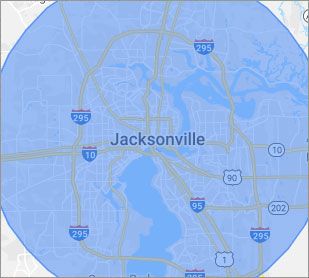
What is your Service Area for on-site Computer Repair?

Our primary on-site mobile service areas include the greater Jacksonville Metropolitan Area and the Orlando, Tampa, Atlanta, Charlotte, Nashville, Memphis, Virginia Beach, Houston, Indianapolis, Cleveland, Richmond, Raleigh and Louisville metro areas.

We provide remote and mobile computer repair in Jacksonville, Fruit Cove, Oakleaf Plantation, Jacksonville Beach, Palm Valley, Bellair-Meadowbrook Terrace, Yulee, St. Augustine, Middleburg, Atlantic Beach, Fernandina Beach and Nocatee.

Our on-site Computer Service Area

What should someone expect that hires you for Computer Service?

Our mission is to fully resolve your computer problems quickly and affordably. If you want a Computer Engineer that can fix all of your computer problems instead of a computer tech, a computer geek, a technician or a computer guy that can only fix some of your problems; call us at (904) 497-4300.  

What types of Computer Services do you perform?

We service businesses and business clients in their homes, including:
 
  • Diagnose / repair hardware or software problems
  • Spyware, malware, trojan and virus removal
  • Setup wireless and small business networks
  • Laptop repair, PC repair and Apple repair
  • Hard drive data recovery

Jacksonville Computer Repair Service Contact Information

Jacksonville Computer Repair Service
Jacksonville, FL 32202
(904) 497-4300

Jacksonville Computer Repair Service is a Karls Technology company

* *
*
*
*
  *
* *


*
*
* * * * * * * * * * * * * * *
4.9 / 5 stars from 348 reviews

"Great service and easy to work with!!!"

Jacksonville Computer Repair Service 5 / 5 stars

"Sean was wonderfully professional, quick and precise."

Jacksonville Computer Repair Service 5 / 5 stars

"Josh was amazing. Very professional, helpful and took a great deal of time explaining things to me. Very impressive."

Jacksonville Computer Repair Service 5 / 5 stars

"Very professional, great experience. So nice to have this service available. This tech was user friendly didn’t talk over my head."

Jacksonville Computer Repair Service 5 / 5 stars
Best Antivirus Software of 2026: The Ultimate Guide to Cybersecurity Brands

In 2026, the digital threat landscape has shifted. We are no longer just fighting simple viruses; we are defending against AI-generated phishing, sophisticated ransomware-as-a-service, and complex identity theft. Choosing the right antivirus brand is no longer optional—it is the foundation of your digital life. At Karls Technology, we’ve analyzed the top-performing security suites of the […] The post Best Antivirus Software of 2026: The Ultimate Guide to Cybersecurity Brands appeared first on Computer Repair Blog.

Using Multiple Monitors

If you’re using multiple monitors, you may simply drag a window over to the side by pressing the Windows key and the appropriate arrow keys. Windows + P instantly enables a second monitor, while Shift + Windows Key + Arrows transfers the window to the next available monitor. Mission Control allows Mac users to view […] The post Using Multiple Monitors appeared first on Computer Repair Blog.

Hide Taskbar Temporarily on Windows 10

Using Windows’s taskbar settings, you can temporarily hide the bar if you just need to do so. To customize your taskbar, right-click anywhere on it and choose “Taskbar Settings.”Move the slider under Desktop mode to enable the option to automatically conceal the taskbar. The desktop mode option enables full-screen mode when used. Simply move your […] The post Hide Taskbar Temporarily on Windows 10 appeared first on Computer Repair Blog.

Backing Up Your iPhone

Repeatedly saving your iPhone’s data is highly recommended. Keeping a full backup is a smart idea even if your phone has never been lost or stolen. Your data is safe even if your device is taken or lost because you may be able to erase it remotely. You can rest assured that you will always […] The post Backing Up Your iPhone appeared first on Computer Repair Blog.

Guide to Antivirus Brands in 2025

Karls Technology’s Comprehensive Guide to the Best Antivirus Brands in 2025 In today’s digital age, cybersecurity is more critical than ever. With the increasing number of cyber threats, from malware and phishing attacks to ransomware and identity theft, having reliable antivirus software is a necessity. The market is saturated with numerous antivirus brands, each offering […] The post Guide to Antivirus Brands in 2025 appeared first on Computer Repair Blog.

Protect Your Personal Information – Change Password

If your password has been compromised as a result of a security breach, you should change it promptly. Do not use the same password on multiple websites. Hackers and crooks are well-versed in all trade secrets. You can reduce the amount of damage done by using a different, strong password for each protected site you […] The post Protect Your Personal Information – Change Password appeared first on Computer Repair Blog.

Android Spyware RatMilad

“RatMilad,” a new Android spyware meant to spy on users and collect data, has spread throughout the Middle Eastern countries. Zimperium found RatMilad and said it might be used for cyber espionage, extortion, or eavesdropping. Zimperium discovered RatMilad. NumRent, a phony random number generator, is generating social media accounts. RatMilad can sideload if given the […] The post Android Spyware RatMilad appeared first on Computer Repair Blog.

Windows Text-To-Speech

The Windows text-to-speech functionality is a vital aid for the visually impaired. It’s helpful if you learn best through listening or if you have reading difficulties like dyslexia. This function reads out loud everything you see on the screen, lists the currently running apps and windows, and more. Windows Narrator, a text-to-speech tool, is built […] The post Windows Text-To-Speech appeared first on Computer Repair Blog.

Apple’s 16.0.3 Update

Update is available! Just released, Apple’s iOS 16.0.3 includes a number of fixes for previously reported issues as well as enhancements to the speed of a number of apps and functions, such as notifications and the Camera app. In order to update to iOS 16.0.3, launch the Settings app on your iPhone, tap General, and […] The post Apple’s 16.0.3 Update appeared first on Computer Repair Blog.

Changing Default Browser on Windows 11

Changing your default browser on Windows 11 is really easy. Click on the Start menu, then go to Settings, then Apps, and finally Default Apps. Simply choose your preferred browser and click “Set default” to make it your default browser. Keep in mind your desired default browser is selected in both the HTTP and HTTPS […] The post Changing Default Browser on Windows 11 appeared first on Computer Repair Blog.